Do you still use the default green-colored Bash prompt?
Then it's time to upgrade to a much improved shell UX using the Bash Color Prompt (bcp).
Results:
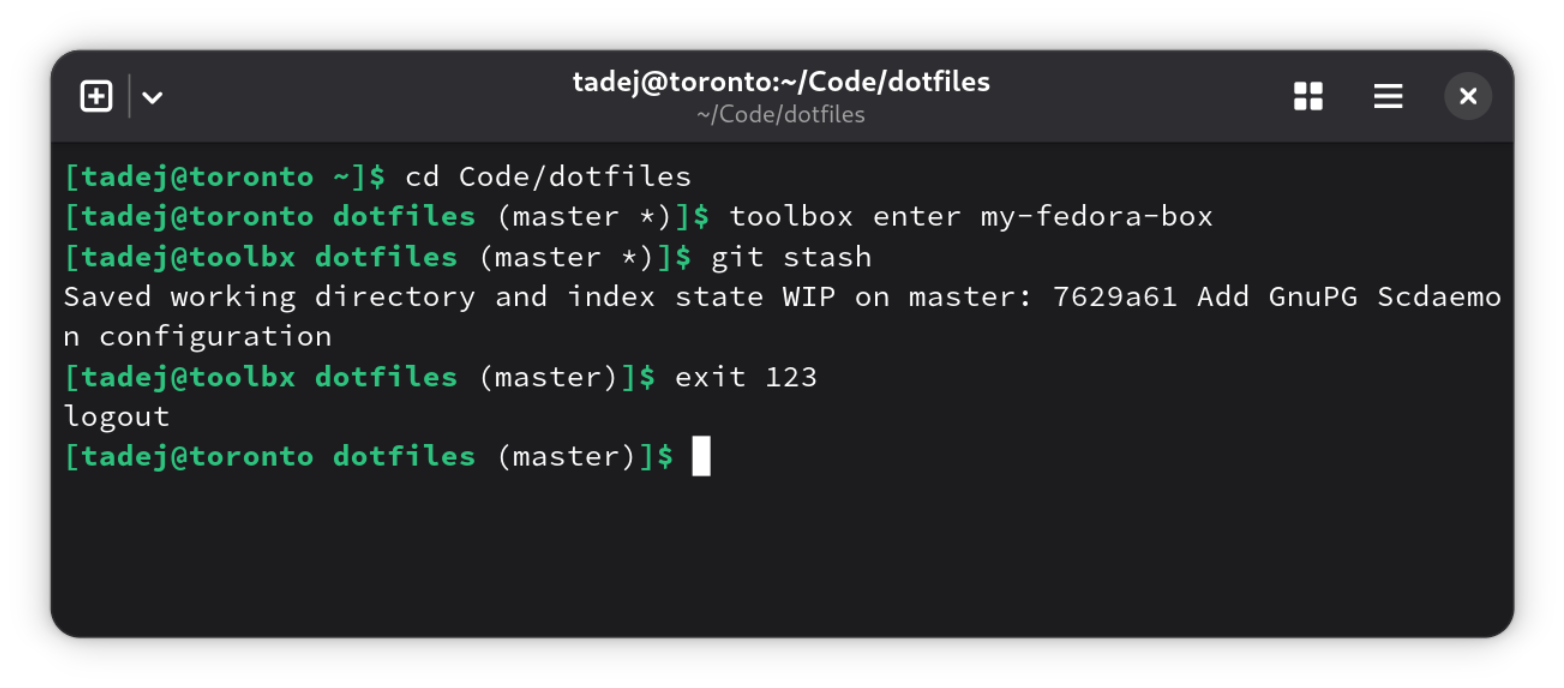
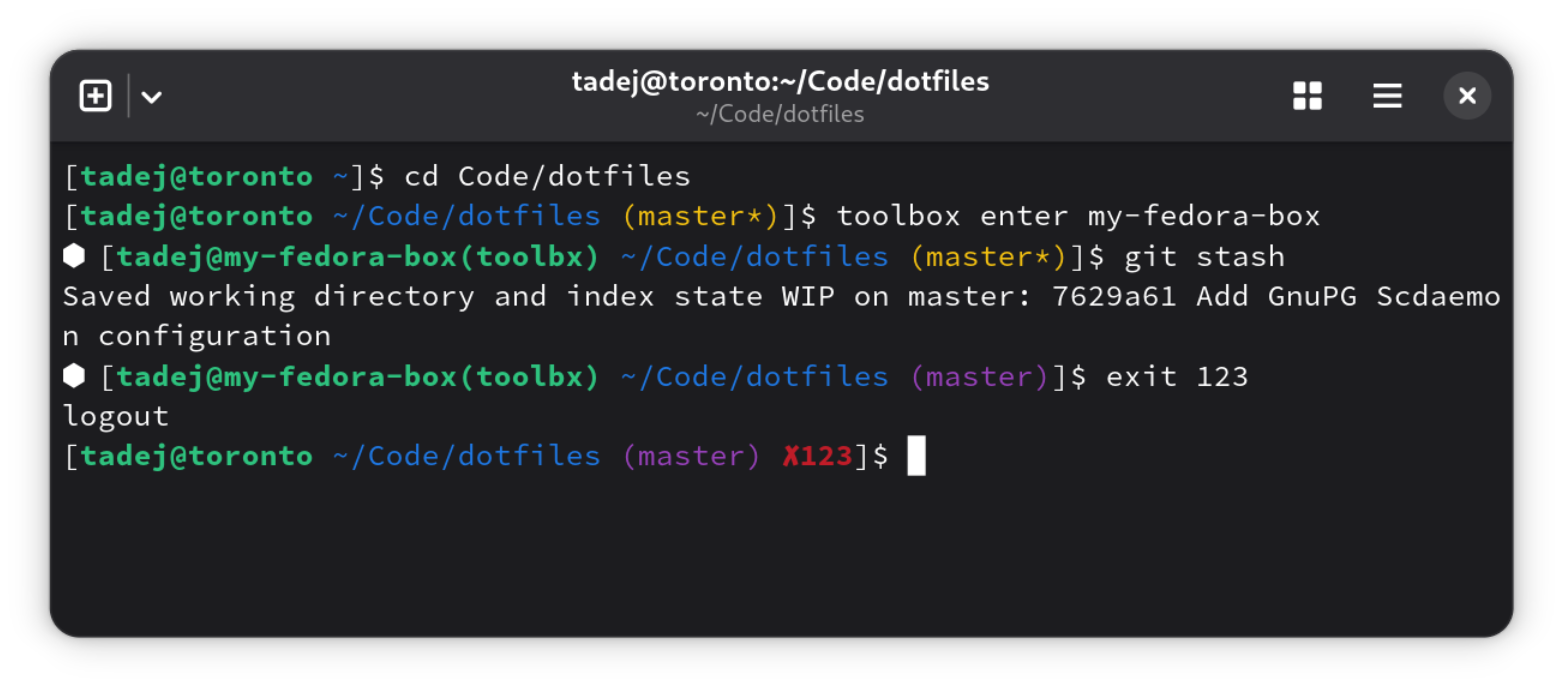
Motivation: dealing with multiple Toolbox containers
Lately, I've been getting annoyed by my current Bash prompt offering me a poor UX when dealing with multiple Toolbox containers. The prompt lacked crucial information: to which of the running containers a given shell belongs to?
I did a quick search to see if there's an easy fix I'm missing out but it turned out there is a long-standing desire to improve Toolbox's UX in this respect and multiple approaches have been discussed/tried. Here are some relevant tickets:
- Making Toolbox containers set container name as hostname: Rejected as unsuitable.
- Offer a better way to visually distinguish between containers: Currently still open.
- Expose the name of the current toolbox container: Closed, but one
still needs to manually extract information from
/run/.containerenvfile and set the Bash prompt according to it.
Discovering the old and new version of Bash Color Prompt
After looking around on how to update my Bash prompt to become
"container name"-aware, I came across Fedora's shell-color-prompt package
which was conveniently just a dnf install bash-color-prompt away (strangely,
the source package is named shell-color-prompt while the binary package is
named bash-color-prompt, see also RHBZ #2291024).
My attempts at configuring the Bash prompt to be "container name"-aware with the help of shell-color-prompt didn't look very promising.
I had a little epiphany when discovering that shell-color-prompt's maintainer, Jens Petersen, recently wrote a replacement for it: namely Bash Color Prompt (bcp). Jens describes it as having a cleaner declarative approach for creating one's custom Bash prompt.
Setting up the new version of Bash Color Prompt
Seeing how easy Bash Color Prompt (bcp)'s example.bashrc.sh looked like, I decided to give it a try.
It worked and its declarative approach at creating a custom Bash prompt was really easy to follow and tailor to my needs.
Currently, until the new version of Bash Color Prompt (bcp) is packaged in Fedora (and other distributions), a simple way to install it is to just grab the bash-color-prompt.sh file directly from its GitHub repository and put it somewhere in your home directory.
Afterwards, just source and configure it in your .bashrc file. Here is how
I've done it:
# Use the new Bash Color Prompt (bcp) by Jens Petersen (Red Hat) to handle PS1.
# NOTE: Temporarily, I've just copied the script from:
# https://github.com/juhp/bash-color-prompt/blob/main/bash-color-prompt.sh
if [ -f $HOME/bash-color-prompt.sh ]; then
    source $HOME/bash-color-prompt.sh
fi
# Configure bcp.
bcp_layout() {
    local exit_code=$1

    # hexagon
    bcp_container

    # opening [
    bcp_append "["

    # user@host or user@container(host)
    local user_color="green"
    if [[ $EUID -eq 0 ]]; then user_color="red"; fi
    local machine="\h"
    if [ -f /run/.containerenv ]; then
        container_name=$(grep -oP '(?<=name=")[^"]+' /run/.containerenv)
        machine="$container_name(\h)"
    fi
    bcp_append "\u@$machine " "$user_color;bold"
    bcp_title "\u@$machine:\w"

    # directory
    bcp_append "\w" "blue"

    # git status
    bcp_git_branch " " "magenta" "yellow"

    # status indicator
    if [[ $exit_code -ne 0 ]]; then
        bcp_append " ✘$exit_code" "red;bold"
    fi

    # actual prompt char
    bcp_append "]\$ " "default"
}
# Initialize bcp.
bcp_init